Descript seats and license rules, and who needs a paid seat
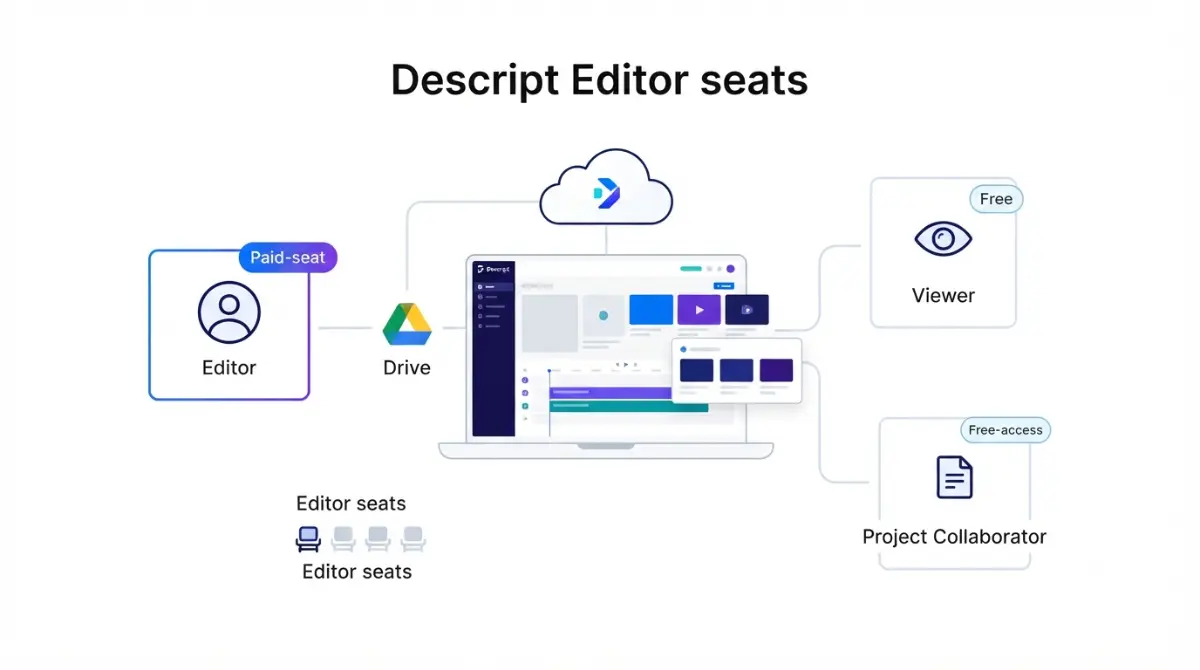
Table of Contents
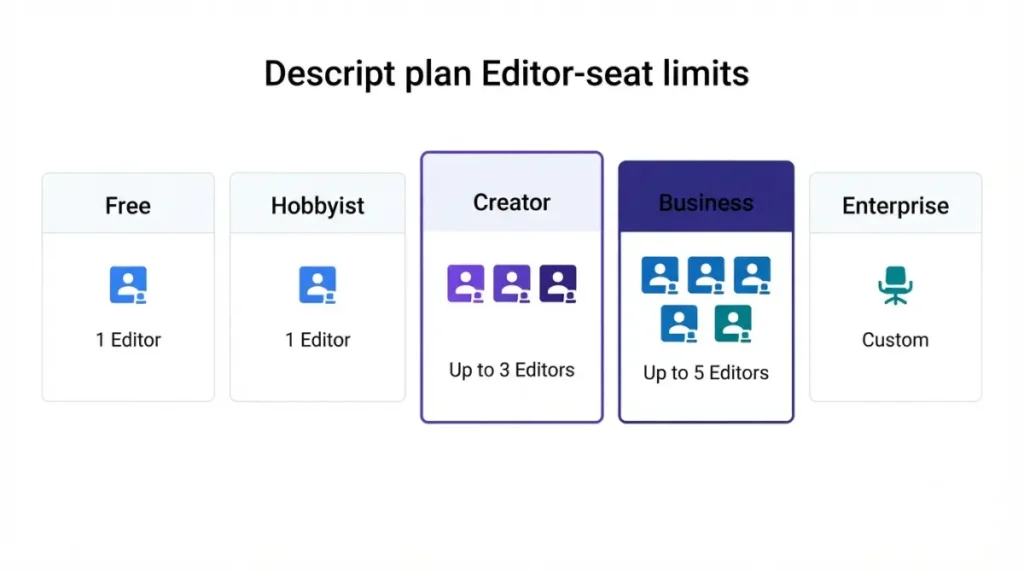
A Descript seat is a paid Editor role on one drive, billed per person; Viewers and project-level collaborators are free, per Descript’s help centre on 11 September 2026. On 11 September 2026, Descript’s pricing page capped Editors at one on Hobbyist, three on Creator and five on Business. Removing an Editor frees the seat, but Descript keeps billing it until you reduce the seat count.
How many Descript seats each plan allows
Descript prices every paid plan per person and caps how many Editors a single plan can hold.
Priced per person, capped per plan
| Plan | Editor seats | Per person / month (annual · monthly) | Who hits this |
|---|---|---|---|
| Free | 1 (11 Sep 2026) | $0 (11 Sep 2026) | One person evaluating |
| Hobbyist | 1 (11 Sep 2026) | $16 · $24 (11 Sep 2026) | A solo editor |
| Creator | 1–3 (11 Sep 2026) | $24 · $35 (11 Sep 2026) | Two or three editors |
| Business | Up to 5 (11 Sep 2026) | $50 · $65 (11 Sep 2026) | Four or five editors |
| Enterprise | Not published (11 Sep 2026) | Custom quote (11 Sep 2026) | Teams past five editors on one drive |
Every cell above comes from Descript’s pricing page, retrieved 11 September 2026.
🗓️ Pricing verified 11 September 2026. Software pricing changes frequently — confirm on the vendor’s site before purchasing.
One drive, one bill
Each drive carries its own separately billed plan, per Descript’s cancellation and seat guide retrieved 11 September 2026. A second drive is a second subscription.
For the totals, see what two to five editors cost in total. If you haven’t chosen a tier, start with every Descript plan and its hidden costs.
Which Descript roles need a paid seat
Only Editors, including the drive owner, occupy paid seats. Everyone else working on a Descript project can be free.
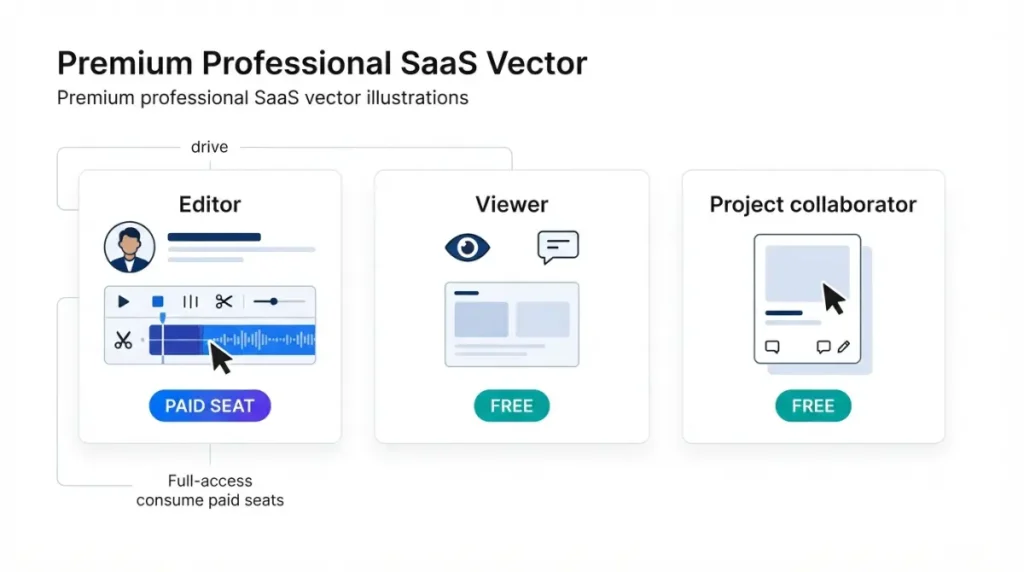
Drive roles: owner, Editor, Viewer
| Role | Paid seat | Can do | Can’t do | Source · date |
|---|---|---|---|---|
| Drive owner | Yes, one seat | Everything an Editor can, plus billing and member roles | Hand over ownership in the app | Roles guide; seat guide · 11 Sep 2026 |
| Editor | Yes | Edit, export, upload, record, run AI tools, invite Editors | Change member roles | Roles guide · 11 Sep 2026 |
| Viewer | No | View, comment, invite Viewers | Edit, export, record, spend media minutes or AI credits | Roles guide · 11 Sep 2026 |
| Project editor | No | Edit and export one shared project | Upload, record, use AI tools | Project access guide · 11 Sep 2026 |
| Project commenter | No | View and comment on one project | Edit or export | Project access guide · 11 Sep 2026 |
Matrix assembled by App Compare HQ from Descript’s drive membership roles guide and project access guide, both retrieved 11 September 2026.
Descript’s own collaboration page, retrieved 11 September 2026, conflicts with this table in three ways:
- It still calls free members “Basic”.
- It says they can screen record.
- It quotes Editor seats from $12 a month, below every rate in Section 1.
The help centre and pricing page agree with each other, so this table follows them. Neither of those, checked 11 September 2026, states how many Viewers a self-serve drive can hold. The only “unlimited” claim sits on the conflicting page.
Project collaborators sit outside the seat count
A project collaborator is invited to one project, not the drive, and Descript’s project access guide labels them unpaid. A freelancer who only trims and exports can work this way. Anything that spends media minutes (what counts as a media minute) or AI credits needs a drive-level Editor.
Can two people share one Descript login
Descript’s terms allow a shared login in one narrow case. Section 3 of its Terms of Service, last updated 25 February 2025 and retrieved 11 September 2026, bars sharing account credentials. The one exception is your own employee or contractor who has accepted the terms and uses Descript only to do their job for you.
What the terms allow
Descript calls that person an Authorized User, and you stay responsible for everything done under the account. Section 8.3(b) of the same terms separately bars using another user’s account without authorization from both that user and Descript.
What they leave open
Every paid rate on Descript’s pricing page is labelled per person. Descript’s published pages, checked 11 September 2026, do not say how that label fits with the employee-and-contractor exception.
🔍 Why It Works This Way: The pricing page lists media minutes and AI credits per editor, so one shared login contributes one seat’s allowance to the drive, however many people use it. That is our reading of Descript’s published figures, not a Descript statement.
If a second person needs to edit, the route Descript documents is a second Editor seat, as set out in the role table above. For anything else, get Descript’s answer in writing first.
How paid seats get added without the owner
A paid seat can enter a Descript drive three ways, and only one of them needs the owner.
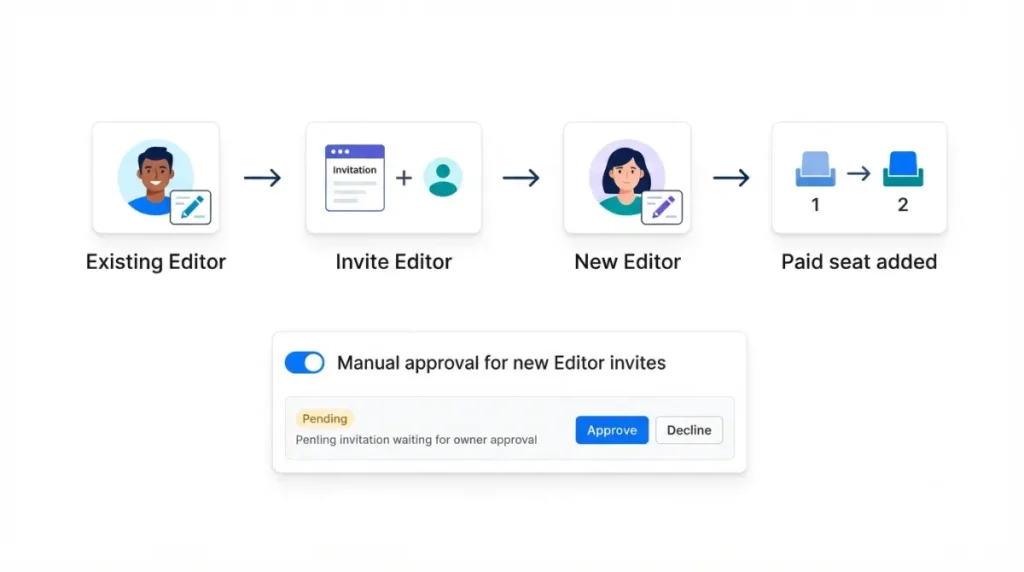
Any Editor can invite an Editor
By default, any Editor can invite new drive members, Editors included, per Descript’s drive membership roles guide retrieved 11 September 2026. The same guide says a mid-cycle Editor is prorated and co-termed with your plan. It also says upgrading a Viewer to Editor adds a paid seat unless one is already free.
✅ Do This: As drive owner, go to Settings > Members and turn on “Manually approve new editor invites.” Editor invites then wait as pending until you approve them.
The checkbox that buys a seat
Sharing a single project costs nothing. Ticking “Also invite to drive” in the project access panel adds that person to the drive and charges an additional Editor seat, per Descript’s project access guide retrieved 11 September 2026. Leave it unticked for one-off collaborators.
The seven-day window, and who it covers
Descript’s refund policy, retrieved 11 September 2026, covers one seat case: another editor adds an unapproved or unwanted Editor. The drive owner can then request a refund within seven days of the invoice date, using their Descript account email. The rest of Descript’s terms are in which Descript charges can be refunded.
⚠️ This Costs You: A seat you added yourself falls outside that window, and so does an unwanted seat noticed after day seven. Either one bills until the seat count comes down, covered next.
Why removing an editor doesn’t cut the bill
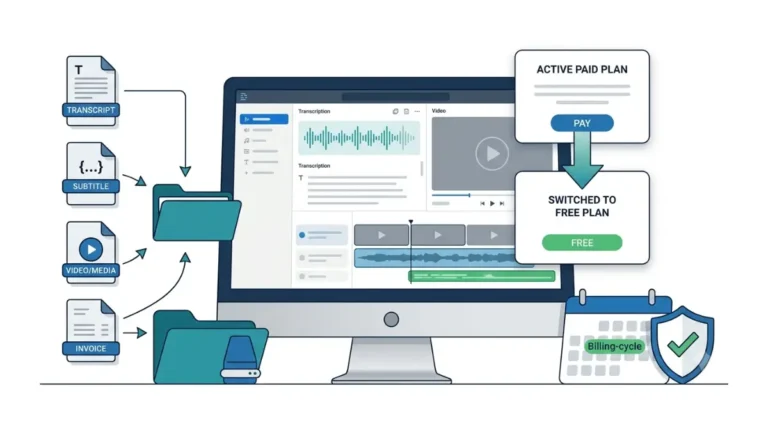
Removing an Editor frees a paid seat, but Descript bills that seat until you manually reduce the seat count, per its guide to removing drive members retrieved 11 September 2026.
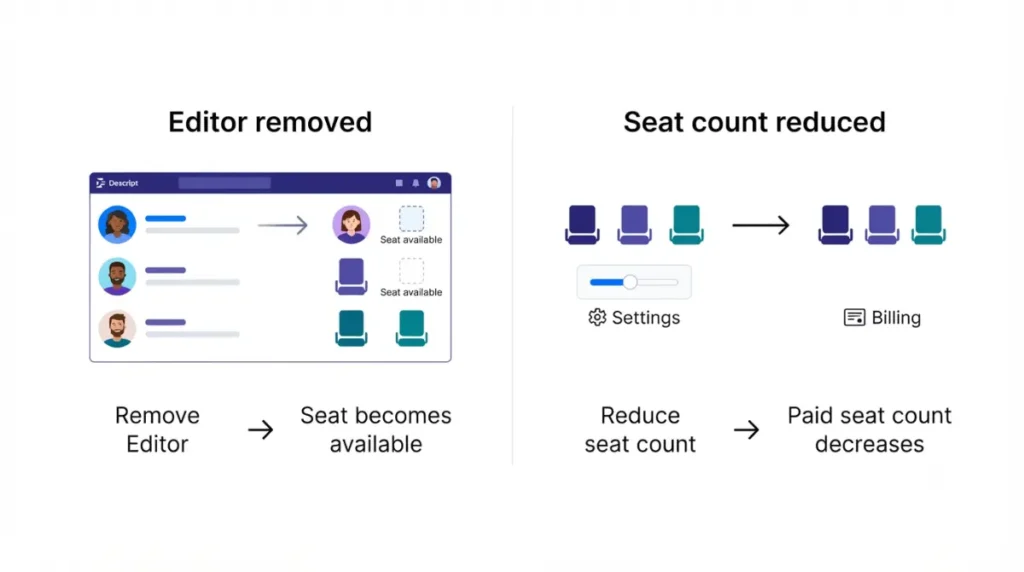
Removal frees a seat, not a charge
A freed seat is reusable. Remove the departing person, invite the replacement as an Editor, and they take the open seat, per the same guide. Downgrading an Editor to a Viewer also releases their seat, per the roles guide in Section 4.
Reduce the seat count
Descript’s seat and cancellation guide, retrieved 11 September 2026, gives these steps:
- Sign in to Descript on the web, or open the desktop app.
- Open App Settings with Command or Control plus comma.
- Select Edit current plan, lower the number of seats, and click Save changes.
Setting seats to one limits editing to the drive owner. A past-due account or failed payment blocks the change until it’s resolved.
Descript’s steps don’t say whether a lower count applies immediately or at the end of the billing cycle. They also don’t say whether it is prorated. We could not verify either.
Before you remove anyone
🛟 Back This Up First: Removed members lose access at once to drive projects they didn’t create or weren’t shared on, and project owners keep the projects they created unless ownership moves. Transfer every project the departing person owns to a remaining Editor before you remove them.
🧾 Not Tested: We have not operated a paid multi-seat Descript drive, so we could not see the Members tab, a seat invoice, or what a reduced seat count does to the next bill. Everything above comes from Descript’s public pricing page, help centre and Terms of Service, retrieved 11 September 2026.
When the drive owner leaves, and what the license covers
The drive owner controls cancellation, so plan the owner’s exit before it happens. Descript support only processes cancellations from the owner’s email address, per its cancellation guide retrieved 11 September 2026.
Transferring the drive
Ownership can’t be changed in the app. Descript’s drive transfer requirements, retrieved 11 September 2026, list three conditions:
- The drive has a paid subscription.
- The new owner is already an Editor.
- The new owner holds a free or paid drive with a card on file.
🛟 Back This Up First: Invoice history is lost in the transfer, so download every invoice first. Projects in the old owner’s Personal workspace stay there, so move them to the General workspace, which every drive member can see per Descript’s drive view guide.
If the plan is ending rather than moving, export your projects before a plan change.
What the license gives you, and doesn’t
Section 5.1 of the terms grants a limited, nontransferable, revocable license for your own personal or internal business use. Section 8.4 says you own your inputs and outputs to the extent the law protects them. It also says Descript may train its models on them unless you have opted out. The pricing page listed training opt-out under Enterprise on 11 September 2026.
Descript seat and license questions, answered
1. Can two people share one Descript account?
Descript’s terms, last updated 25 February 2025, allow sharing only with your own employee or contractor, and don’t explain how that fits per-person pricing.
2. Do Descript viewers need a paid seat?
No. Descript’s roles guide, checked 11 September 2026, lists Viewers as free; they can view and comment but can’t edit or export.
3. How many editors can a Descript plan have?
On 11 September 2026, Descript allowed one Editor on Free and Hobbyist, up to three on Creator, and up to five on Business.
4. Does removing a member lower my Descript bill?
No. Removing an Editor frees the seat, but Descript bills it until you lower the seat count in Edit current plan.
5. Can a Descript editor add paid seats?
Yes. By default any Editor can invite new Editors; the drive owner can require manual approval of editor invites under Settings, then Members.
6. Can I get a refund on an extra Descript seat?
Descript refunds a seat only when an editor added an unapproved or unwanted Editor and the owner asks within seven days, checked 11 September 2026.
7. How do I transfer a Descript drive?
Through Descript support: the drive must be on a paid plan, and the new owner must be an Editor with a card on file.
8. Who owns what I make in Descript?
You do, to the extent the law protects it, under Section 8.4 of Descript’s terms, which also allows model training unless you opt out.
9. Can a freelancer edit a Descript project without a seat?
Yes. Descript’s project access guide, checked 11 September 2026, calls project editors unpaid; they can edit and export but can’t upload or use A
Count editors, then check the seat count
Pay for the people who edit, upload or run AI tools, and make everyone else a Viewer or project collaborator. Turn on editor-invite approval. After every removal, lower the seat count in Edit current plan.