Descript Quota Exceeded on web: what it means and how to fix it
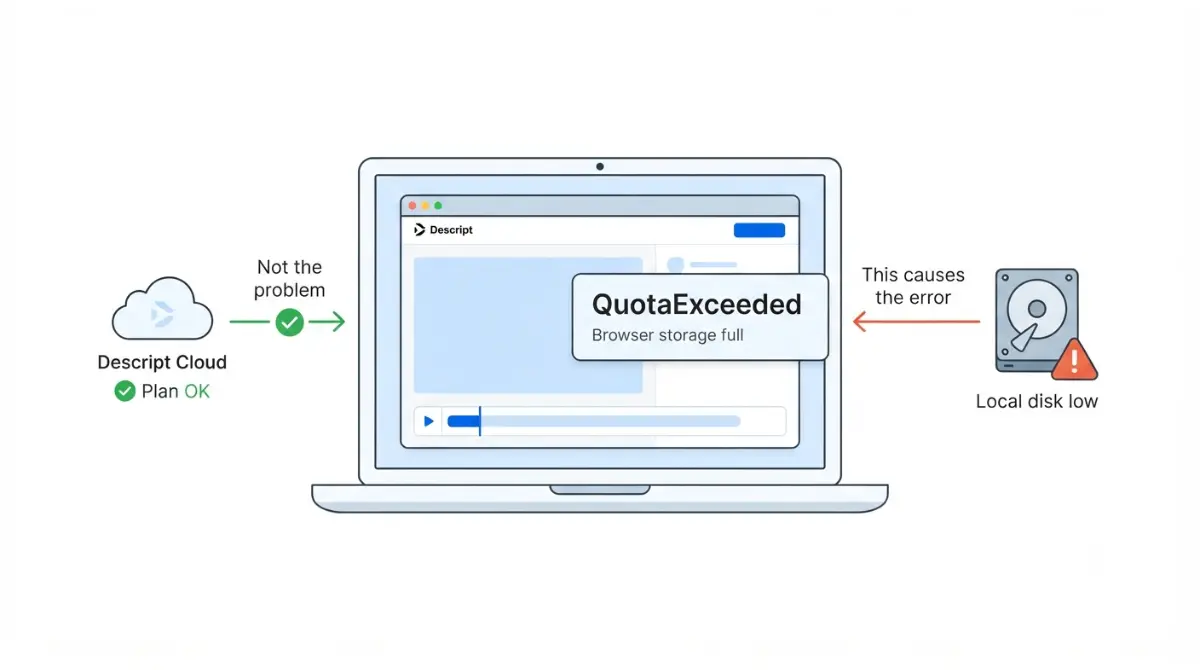
Table of Contents
QuotaExceeded on Descript for Web is a browser storage error, not a Descript plan limit. Descript’s help center says to free up at least 20 GB of local disk space, close other tabs and windows, and bookmark the web editor to enable persistent storage (retrieved 18 September 2026). Your plan’s cloud storage — 5 GB on Free — is unrelated.
Why a storage error has nothing to do with your plan
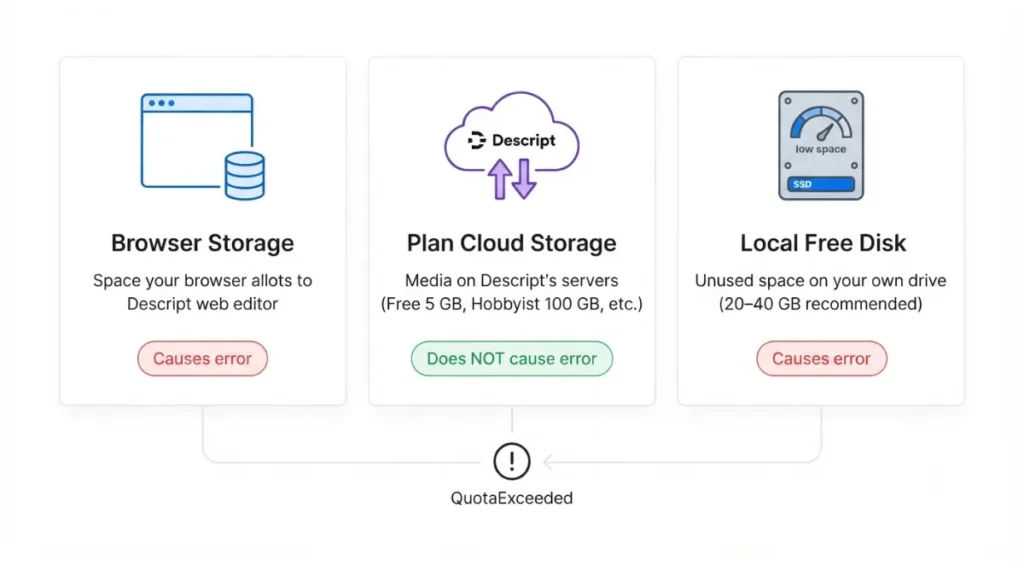
Descript uses the word storage for three different things, and only two of them produce this error.
| What it’s called | What it actually is | Current figure | Causes this error? |
|---|---|---|---|
| Browser storage quota | Space your browser allots to the Descript web editor | Set by the browser; Descript publishes no figure | Yes |
| Plan cloud storage | Media Descript holds on its servers | Free 5 GB · Hobbyist 100 GB · Creator 1 TB · Business 2 TB (Descript pricing page, 18 September 2026) | No |
| Local free disk | Unused space on your own drive | At least 20 GB; 20–40 GB recommended (Descript system requirements, 18 September 2026) | Yes |
The two that cause it
The error comes from your browser, not from Descript’s servers. MDN documents it as a browser-level exception raised when an operation would exceed a system-imposed storage limit. Descript’s own system requirements page puts it plainly: the product uses cloud storage, but certain actions still rely on your local disk.
The one that doesn’t
Your cloud storage limit governs media held on Descript’s servers, and raising it changes nothing about what your browser will allocate. If you are separately weighing tiers, what each Descript plan actually costs covers that — but do not buy one expecting it to clear this message.
💵 Verified: At least 20 GB of free local disk space, 20–40 GB recommended — Descript’s system requirements page, retrieved 18 September 2026.
🔍 Why It Works This Way: Under storage pressure such as low disk space, browsers evict stored data from the least recently used origin, which is why freeing disk space on your own drive resolves a message that appears to come from Descript (web.dev, retrieved 18 September 2026).
The fix, in the order Descript publishes it
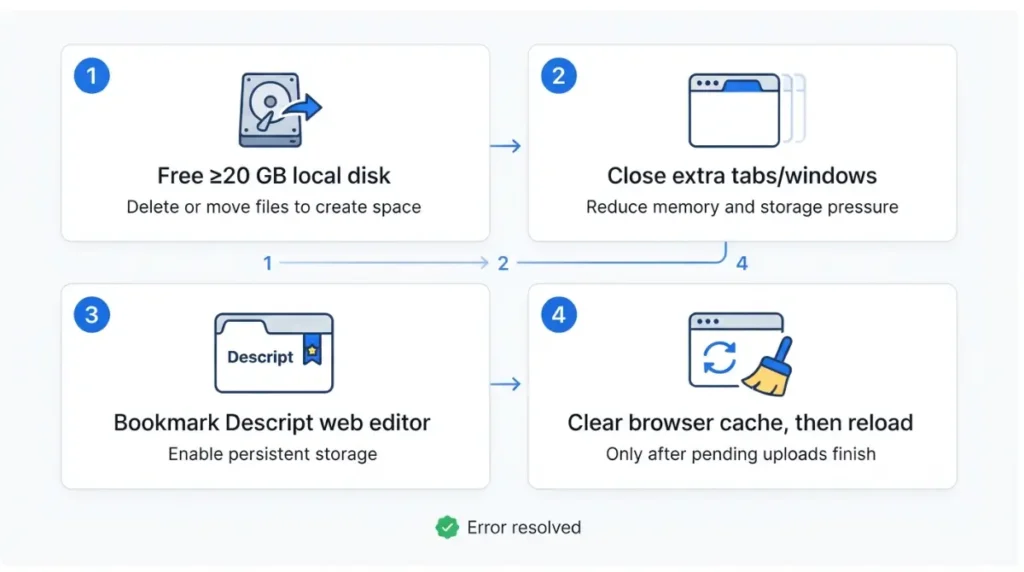
These four steps are Descript’s published sequence for the web editor, retrieved 18 September 2026; step 3 and step 4 apply to Descript for Web only.
🛟 Back This Up First: Descript warns against clearing browser data if you have files pending recovery. Before step 4, let any pending upload or recovery finish and confirm your project is on your Descript drive. If anything is still pending and you cannot wait, skip step 4 entirely and move to the desktop app instead.
- Free up at least 20 GB of space on your local drive.
- Close other browser tabs and windows to release memory.
- Bookmark the Descript web editor, which is Descript’s documented route to enabling persistent storage.
- Clear your browser cache, then reload the page — only after the callout above.
If a step doesn’t apply to you
On the desktop app, steps 3 and 4 do nothing — take steps 1 and 2 and stop there. Descript’s RAM usage on a Mac covers what step 2 is actually buying you.
Browser settings that keep wiping Descript’s storage
If the steps above cleared the error and it returned within a day, a browser setting is deleting the data faster than Descript can use it.
⚠️ This Costs You: A browser set to delete site data on close wipes Descript’s stored data every time you quit, so the error returns on your next session no matter how much disk you freed.
Chrome and Edge
Descript’s documented path is Settings > Privacy and security > Site settings > View permissions and data stored across sites. Search for descript.com, then either clear its data or confirm it is not being cleared on close. Under cookies and other site data, check that descript.com is excluded from clear-on-close.
Safari, private windows and unsupported browsers
In Safari, Descript’s path is Settings > Privacy > Manage Website Data; find descript.com, remove it, then reload. Descript also says to switch out of Private Browsing into a standard window. Chrome, Edge and Opera are the officially supported browsers for the web version, retrieved 18 September 2026.
When it isn’t your machine
Two checks separate a local storage problem from a Descript-side one, and both take under a minute.
Check the status page and changelog
Descript’s status page and its changelog are the first-party surfaces for an outage or a recent release that changed web editor behaviour. A related export failure with a different message — file system limits in your browser — is a file-size problem rather than a quota one, and exports that fail in the desktop app are a separate matter again.
Where to stop and hand it over
If the browser steps and the settings above have not worked, Descript’s documented escalation is to switch to the desktop app, which requires macOS 14 Sonoma or later or Windows 11 or later on a 64-bit system, retrieved 18 September 2026. If you are below that OS floor, or the desktop app fails too, stop troubleshooting and contact Descript support with your project link and the exact error text — that is where self-service ends.
Keeping the error from coming back
Treat the disk figure as a floor you maintain, not a threshold you cross once.
Keep the space free, not just free it once
Descript’s wording is to keep at least 20 GB available, especially on larger projects. Most people delete exactly enough to clear the message and are back inside a week. What Descript asks of your machine covers the rest of the specification.
Let the browser keep Descript’s data
Turn off any setting that deletes site data when you close all windows, and leave the editor bookmarked. Persistent storage is a permission browsers grant based on several signals; it is what stops your data being the first thing evicted when the drive fills.
✅ Do This: Set a reminder to check free disk space monthly, and exclude descript.com from any clear-on-close setting in your browser.
🧾 Not Tested: We did not reproduce this error. It fires on a specific machine under specific storage pressure, and we do not have a dated capture of it occurring. Every step above is Descript’s published instruction, retrieved 18 September 2026, not a fix we have run. The browser and operating system screens marked for capture are public surfaces; no Descript interface screen is shown, because we have not tested the product.
Frequently asked questions
1. Is QuotaExceeded a Descript plan limit?
No. It is your browser reporting that it has run out of storage, and it applies on every Descript plan.
2. How much free disk space does Descript need?
At least 20 GB, with 20–40 GB recommended, per Descript’s system requirements retrieved 18 September 2026.
3. Will upgrading my Descript plan fix QuotaExceeded?
No. Paid tiers raise cloud storage on Descript’s servers, which is not the storage this browser error refers to.
4. Does clearing browser data delete my Descript project?
Descript warns against clearing if files are pending recovery. Media held on your Descript drive sits on Descript’s servers.
5. Why does bookmarking the Descript web editor help?
It is Descript’s documented step for enabling persistent storage, which marks a site’s data so browsers avoid evicting it.
6. Does QuotaExceeded happen in the Descript desktop app?
It is a browser storage error. Descript’s documented escalation, when a browser keeps restricting storage, is the desktop app.
7. Which browsers does Descript for Web support?
Chrome, Edge and Opera are officially supported, per Descript’s system requirements retrieved 18 September 2026. Safari and Firefox may produce errors.
8. Does Incognito or private browsing cause QuotaExceeded?
Descript’s documented step is switching from a private window to a standard one, or trying a different browser entirely.
9. How much cloud storage does each Descript plan include?
5 GB Free, 100 GB Hobbyist, 1 TB Creator, 2 TB Business, per Descript’s pricing page retrieved 18 September 2026.
10. What if I cannot free 20 GB of disk space?
Check Descript’s status page and changelog, then use the desktop app if your machine meets macOS 14 or Windows 11.
The short version
This is a browser problem with a disk-space fix. Free the space, stop your browser deleting Descript’s site data, and keep the editor bookmarked. Nothing on Descript’s price list changes what your browser allocates.