
What actually counts as a Descript media minute
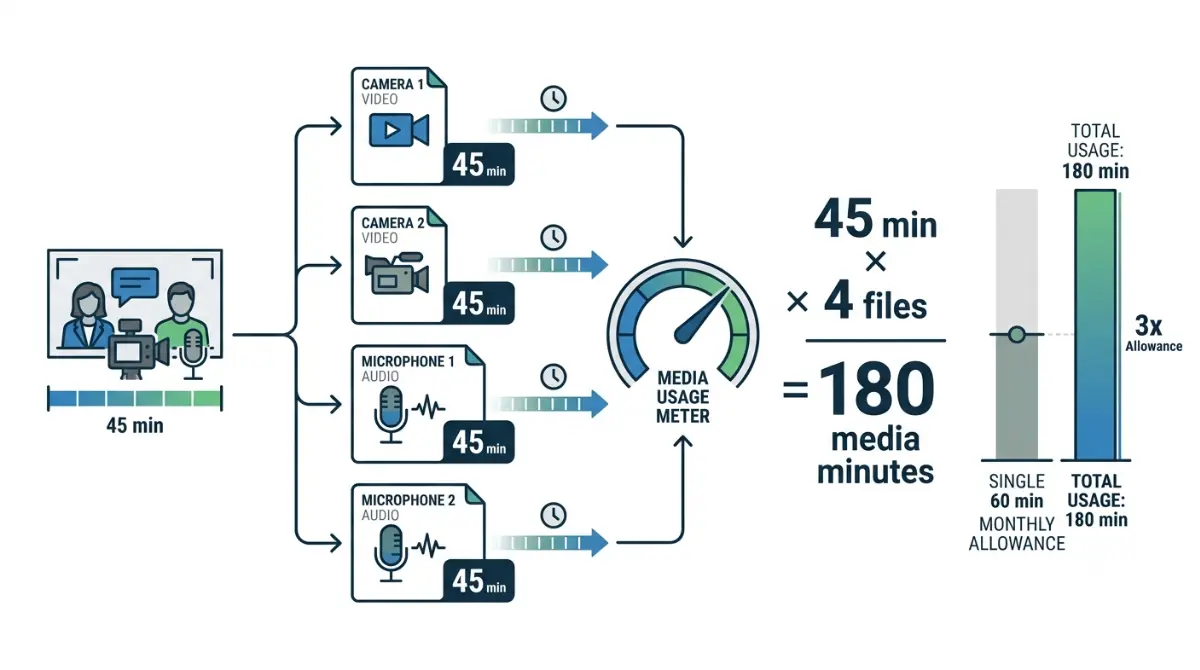
Table of Contents
A Descript media minute is time you upload or record, transcribed or not — and on the free plan you get 60 a month, verified on Descript’s pricing page on 8 September 2026. Still images cost one second each. Importing a file already in your drive costs nothing, which is the only documented way to stretch the hour.
🗓️ Allowances verified 8 September 2026. Software plans change frequently — confirm on the vendor’s site before relying on these figures.
Which meter is emptying, and why it happened early
Two allowances sit under the free plan, and they run out for different reasons.
Two meters, two different walls
Media minutes count what you bring into a project. AI credits count what the AI does once it is there. Emptying one leaves the other running, so the first question is which number moved.
If the watermark is your problem, this is the wrong page
An export gate is not a meter, and no amount of unused allowance clears it. Our companion piece on which limit is actually blocking you covers export quality, file size and seats; what both meters cost across every tier covers the paid plans.
What Descript counts as a media minute
A media minute is time you upload or record in Descript, transcribed or not, per its help centre article on media minutes and AI credits retrieved 8 September 2026.
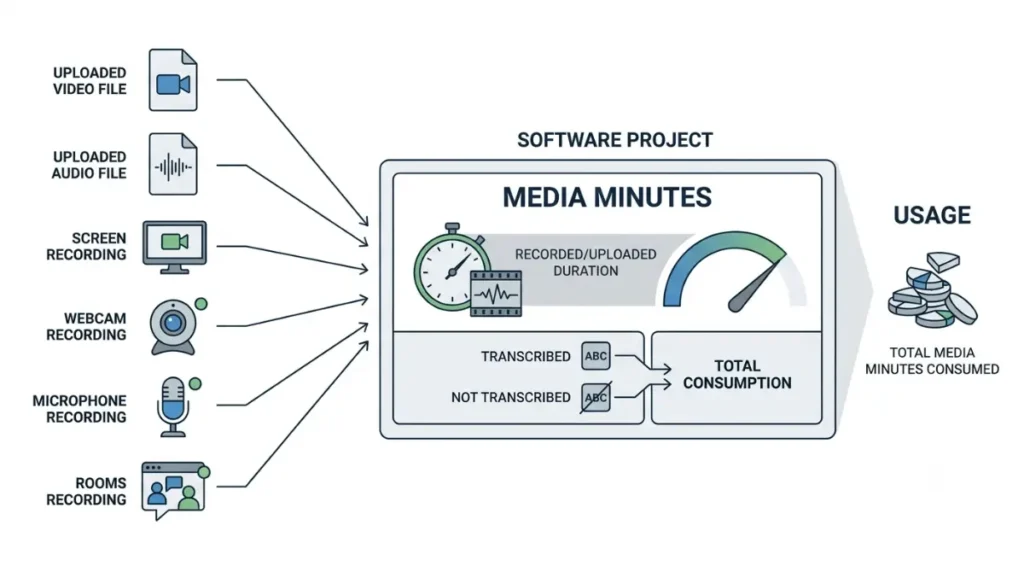
Uploads, recordings, Rooms and screen capture
The same meter covers uploaded video and audio, recordings made inside a project, Rooms sessions, and screen, webcam and microphone capture.
Still images cost one second each
A still image draws one second from the meter, per the same article retrieved 8 September 2026. Unused minutes do not roll over.
The word the definition never uses
Descript’s definition never says transcription.
🔍 Why It Works This Way: The meter charges on ingest, so it counts what you bring in rather than what you publish. Most guides call this allowance transcription hours, which names an output.
Where the same hour gets charged twice
The media meter charges when media enters the account, not when it leaves.
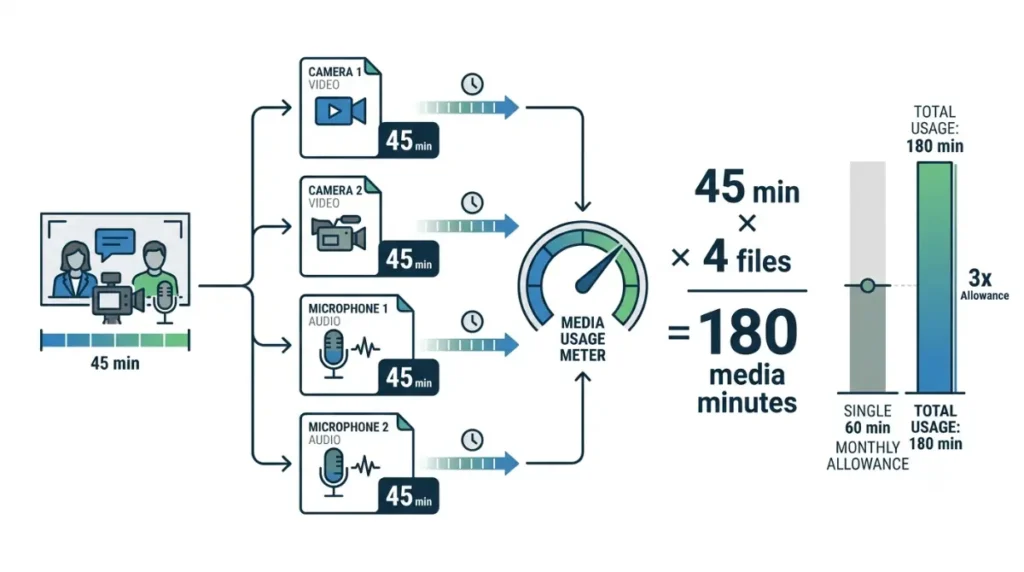
One shoot, four files
Two cameras and two microphones produce four files, and each one draws its own time from the meter. A 45-minute interview delivered that way spends about three times a free month’s allowance before a word is cut. That calculation is ours, from Descript’s published rule.
Cleaning audio elsewhere and bringing it back
Exporting audio, processing it in another application, then uploading the cleaned track spends the meter a second time on the same content. Merging tracks before upload is the only fix upstream of the meter.
Rooms is the exception in your favour
A one-hour Rooms session with five participants draws one hour from the meter, not five, per Descript’s help centre retrieved 8 September 2026.
The imports that cost you nothing
Two documented import routes draw nothing from the meter, per Descript’s help centre retrieved 8 September 2026.
Import from another project instead of re-uploading
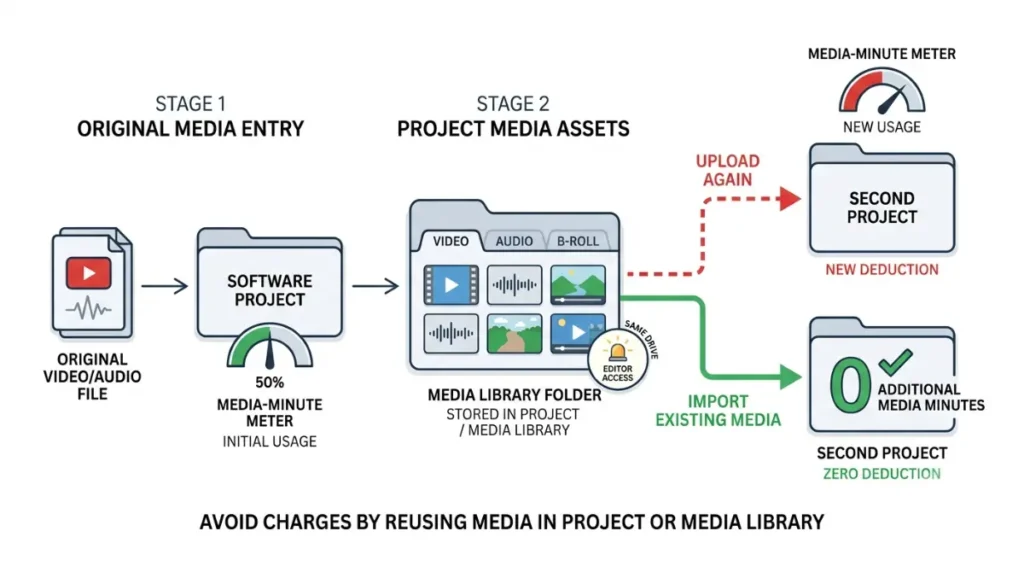
Bringing a file in from another project on the same drive does not consume additional media minutes, and neither does importing from the drive’s Media Library. Uploading the same file a second time does.
An effect already applied is not charged again
A file already carrying Studio Sound, Eye Contact or Green Screen keeps the effect when imported this way, with no second charge. Minutes and credits are deducted when the file is first uploaded and the effect first applied.
The two conditions
Descript states two limits: you need Editor access to the source project, and both projects must sit on the same drive. Neither page states a plan restriction.
What a one-time grant of AI credits actually covers
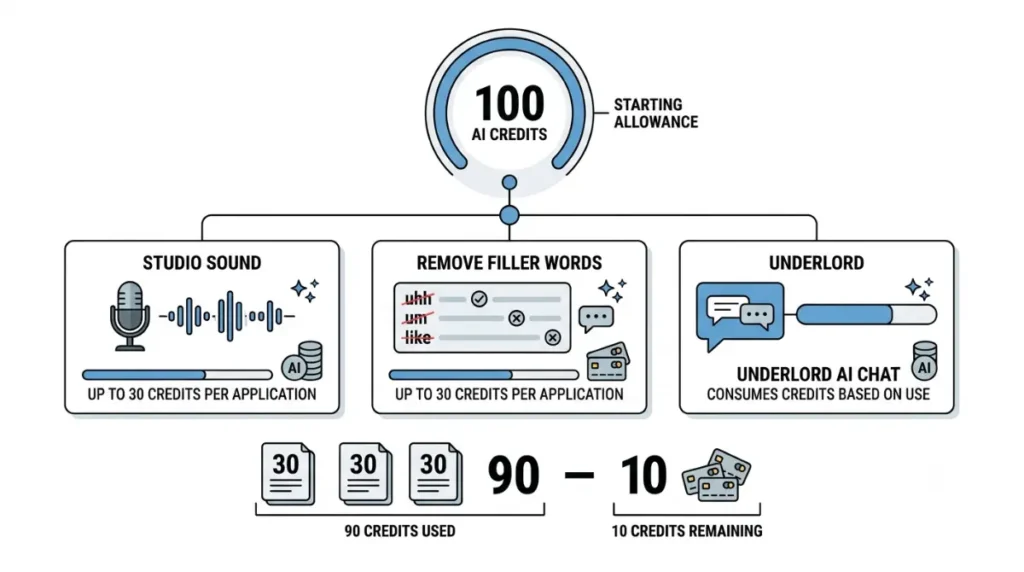
Two AI tools carry a published ceiling: Studio Sound and Remove Filler Words each cost at most 30 credits per application, per Descript’s help centre retrieved 8 September 2026.
The ceiling on the two tools you will use most
💵 Verified: The free plan grants 100 AI credits, marked one-time — Descript’s pricing page, retrieved 8 September 2026.
Against that ceiling, the grant covers about three full-cost applications — our division of two figures Descript publishes separately.
Chatting costs credits too
Every message to Underlord draws credits even when no tool runs, and an edit is charged for both the reasoning and the tool. The cost appears in the Usage tab after the run, never before.
The top-up that isn’t available to you
Top ups are sold only on Creator and Business, per Descript’s top-ups article retrieved 8 September 2026.
⚠️ This Costs You: The help page explaining credits offers a top up to anyone who reaches the limit. On the free plan that purchase does not exist, and our top-up article prices every bundle for the plans that can buy one.
Planning one month before you spend it
The budget is set before you open the editor, because the meter charges on the way in.
Count files, not finished minutes
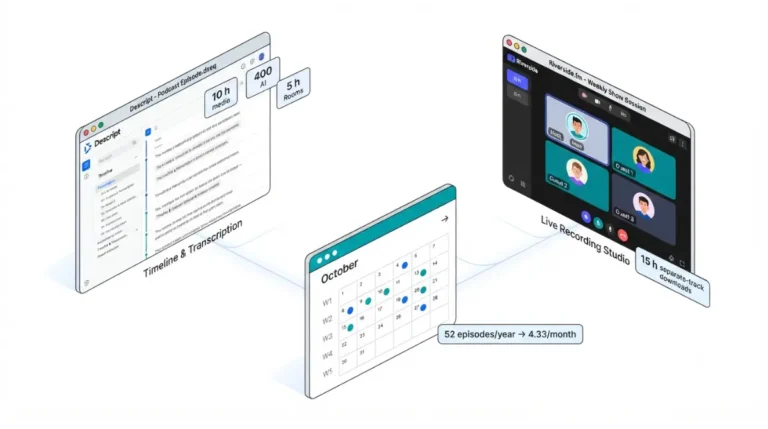
Count the files one episode produces, not its runtime, then multiply by episodes per month. Runtime is not what the meter reads.
Reuse before you re-upload
Park intros, stings and B-roll in one project and import them from there each month, so the allowance pays only for new material.
When the meter, not the watermark, is the reason to pay
Upgrade for the meter only when an ordinary month clears the free allowance, not after one heavy week. Upgrades apply immediately and prorate the unused portion, per Descript’s billing overview retrieved 8 September 2026.
✅ Do This: Decide how many files your next shoot will produce and merge what you can before upload; run the total through our Subscription Cost Calculator.
🧾 Not Tested: We did not open a Descript account, free or paid. Every rule, ceiling and allowance above comes from Descript’s public pricing page and help centre, captured 8 September 2026. Nothing here describes using the software, and no screenshot on this page was taken from a logged-in session.
Descript media minute questions, answered
1. What counts as a media minute?
Time you upload or record — video, audio, Rooms sessions, and screen, webcam or microphone capture, transcribed or not.
2. Do media minutes measure transcription or upload?
Upload and recording. Descript’s definition covers media brought into a project whether or not you transcribe it, retrieved 8 September 2026.
3. Do still images use media minutes?
Yes. Each still image draws one second from the media meter, per Descript’s help centre retrieved 8 September 2026.
4. Does a Rooms session charge per participant?
No. A Rooms recording draws the session length once, however many people joined, per Descript’s help centre retrieved 8 September 2026.
5. Why did one interview cost more than its runtime?
Each file draws separately, so a shoot delivered as four files spends about four times its length against the meter.
6. Can I import a file without spending media minutes again?
Yes. Imports from another project on the same drive, or from your Media Library, consume no additional media minutes.
7. Am I charged twice for an effect already applied?
No. Credits are deducted when the effect is first applied; importing that file again keeps the effect without a second charge.
8. How many AI credits does Studio Sound cost?
At most 30 per application, and the same ceiling applies to Remove Filler Words, per Descript’s help centre retrieved 8 September 2026.
9. Does chatting with Underlord spend AI credits?
Yes. Each message draws credits even when no tool runs, and the cost is visible only after the run.
10. Can I buy more media minutes on the free plan?
No. Top ups are sold only on Creator and Business, per Descript’s top-ups article retrieved 8 September 2026.
The short version
The meter reads what you bring in, so the free month is spent at upload, not at export. Count files before you shoot, keep reusable material in one project and import it from there, and let the allowance pay only for new footage. Upgrade when an ordinary month clears it, not when one week does.
6 Comments