CapCuTT Not Opening on Windows 11? Start With Your Install Source
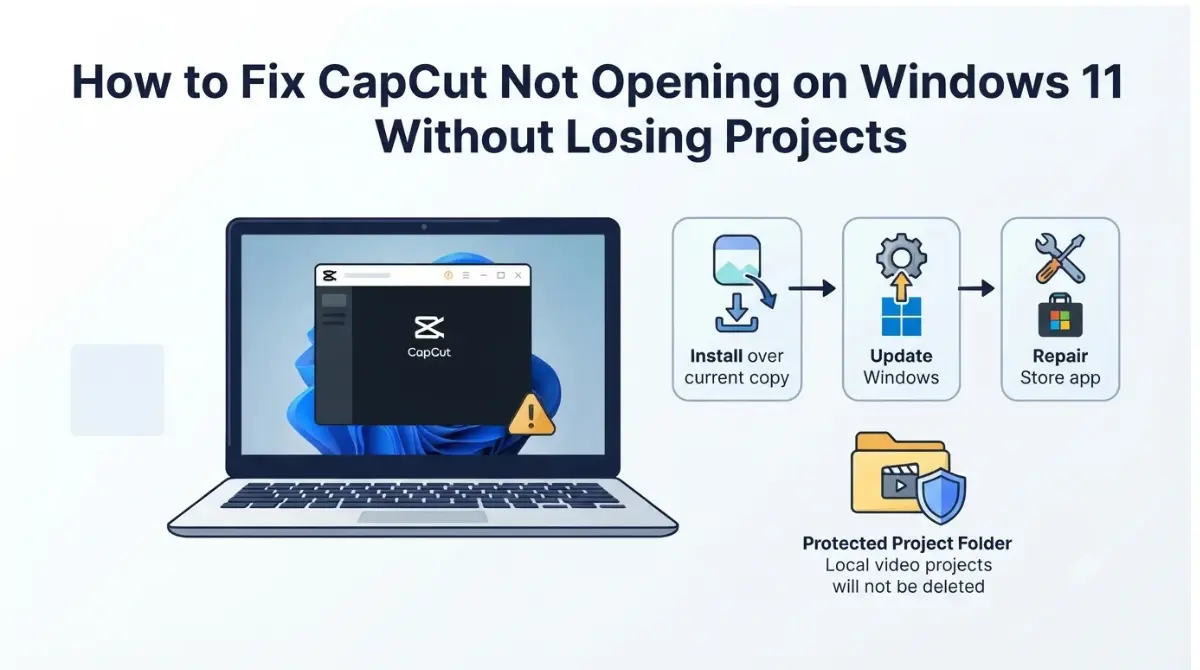
Table of Contents
🧾 Not Tested: No step below describes something we did. Every step is CapCut’s or Microsoft’s, as their pages stated on 7 October 2026, and where their pages are silent this article says so.
If CapCut won’t open on Windows 11, start by installing CapCut’s newest installer over your website-installed copy: CapCut’s help center says projects remain safe that way (page dated 25 Dec 2025), and warns that uninstalling during an update may lose unsynced local projects (31 Dec 2025). CapCut can’t supply older installers (6 Jan 2026), so every fix here goes forward: reinstall over, Windows Update, then repair.
Check your Windows version and install source
CapCut’s Windows guide, dated 20 Aug 2026, lists Windows 10 or above as the minimum for the CapCut desktop app. Other requirements conflict across CapCut’s pages; see CapCut’s conflicting Windows requirements.
Which Windows version are you on?
Right-click Start, choose Settings, then System, then About: Windows specifications show your edition and version, and Device specifications show 32-bit or 64-bit (Microsoft, retrieved 7 Oct 2026).
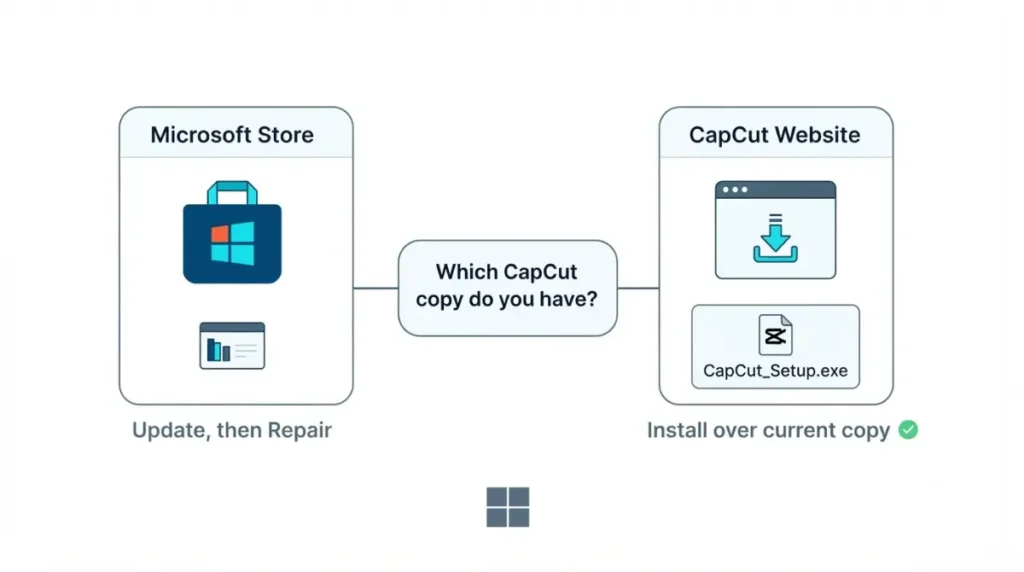
Store copy or website copy?
Microsoft gives Store apps and desktop programs different fixes (retrieved 7 Oct 2026). Unsure? A CapCut entry in the Store’s Library suggests a Store copy (our inference). This guide covers failures before the editor appears, not crashes during editing or export.
What happens when you launch it?
Nothing, or a window that closes: use the steps below. A window that opens with an error: see the connection-error steps.
What CapCut’s own pages say can stop it opening
CapCut’s help center index, retrieved 7 Oct 2026, lists no launch-failure article.
No page names a faulty update
No CapCut page retrieved on 7 Oct 2026 names a faulty Windows build or gives a desktop build number; the Microsoft Store listing text retrieved includes none.
| Advice seen in search results (7 Oct 2026) | What CapCut and Microsoft say | Source and date |
|---|---|---|
| Install an older build | CapCut says it can’t provide older installation packages and recommends updating | CapCut rollback page, 6 Jan 2026 |
| Delete CapCut’s AppData folder | No CapCut or Microsoft page retrieved describes it | CapCut connection page, 31 Dec 2025 |
Why an older version may be disabled
CapCut’s update page says updates often resolve crashes and GPU compatibility, so older versions may be disabled; an outdated version may also stop working with login, cloud services and newer Windows updates (25 Dec 2025).
Install problems CapCut lists
CapCut’s Windows guide (20 Aug 2026) lists checking requirements and re-downloading the installer for failed installs.
Install the newest CapCut over your current copy
This path applies to a website-installed copy on Windows 10 or 11 that won’t start.
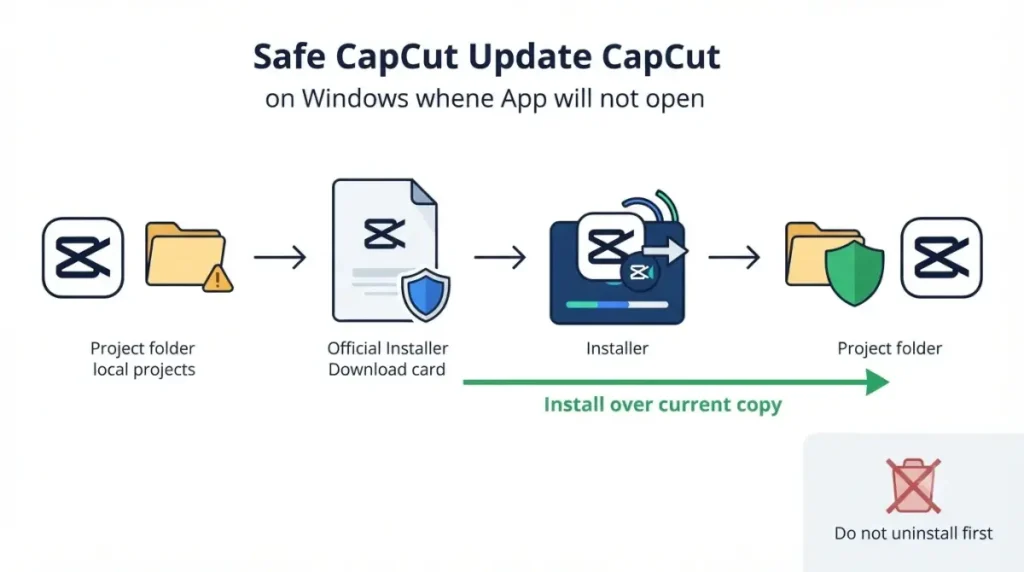
🛟 Back This Up First: CapCut warns that uninstalling during an update may lose unsynced local projects (31 Dec 2025). Don’t uninstall. Export finished videos first if CapCut opens at all. CapCut’s pages don’t say where Windows stores projects.
Steps for a website-installed copy
- Download the newest PC installer from CapCut’s own website (see where to get CapCut’s installer safely); CapCut’s Windows guide (20 Aug 2026) names the file CapCut_Setup.exe, about 200 MB.
- Run it and install over your existing copy, then launch CapCut; CapCut’s update and install-over steps say projects remain safe (25 Dec 2025).
If CapCut opens long enough to update
CapCut says to follow the update prompt, then restart (25 Dec 2025). Its pages give two paths: Settings then Version (25 Dec 2025), and Settings, About, Check for Updates (31 Dec 2025).
Free space before you install
💵 Verified: CapCut says to free at least 1–2 GB if an update fails for lack of space — CapCut help, page dated 25 Dec 2025, retrieved 7 Oct 2026.
Repair or reset CapCut from Windows 11 Settings
These steps apply to a Microsoft Store copy on Windows 11. A website copy may show no Repair or Reset (Microsoft, retrieved 7 Oct 2026); use the install-over steps instead.
Repair first, Reset last
- Select Start, Settings, Apps, Installed apps.
- Select the More icon next to CapCut, then Advanced options.
- Select Repair if it’s available.
🛟 Back This Up First: Neither CapCut’s pages nor Microsoft’s, retrieved 7 Oct 2026, say what Reset removes for CapCut. Export any finished videos you can reach first, or stop and contact CapCut if the projects can’t be replaced.
- If Repair isn’t available or doesn’t fix it, Microsoft’s repair steps say to select Reset (retrieved 7 Oct 2026).
Update through the Microsoft Store and Windows Update
Microsoft’s Store-app fixes, in order (retrieved 7 Oct 2026):
- Select Start, Settings, Windows Update, Check for updates, then Install now if offered.
- In Microsoft Store, select Library, then Get updates.
When Repair or Reset isn’t offered
Microsoft says not every app offers Repair or Reset (retrieved 7 Oct 2026). On a website copy, return to the install-over steps.
When security software or a work PC blocks CapCut
CapCut’s pages name security software and managed PCs as blockers.
Antivirus: what CapCut says, what Microsoft shows
CapCut’s Windows guide (20 Aug 2026) says to disable antivirus temporarily if an install fails; this page doesn’t repeat that. Microsoft says Protection history lists Defender’s actions for two weeks, and Restore on a quarantined file puts it back where Defender flags it again (retrieved 7 Oct 2026). Download a fresh copy from CapCut’s own source instead.
Managed work or school PCs
CapCut says managed computers may restrict updates; ask your IT administrator or use CapCut Web (25 Dec 2025).
Opens but won’t connect
If CapCut opens with a connection error, CapCut’s connection-error steps say to turn off hardware-accelerated encoding and decoding under Settings, Performance, then save and restart; it also suggests checking social or status pages for an outage (31 Dec 2025).
✅ Do This: Stop here if projects matter. Contact CapCut with your device type, OS version, CapCut version and start date (31 Dec 2025); its Microsoft Store listing (retrieved 7 Oct 2026) lists capcut.support@bytedance.com.
How to avoid getting locked out again
These steps apply once CapCut opens again.
Update before deadlines, not during them
CapCut says updates often resolve crashes and GPU compatibility (25 Dec 2025); apply them before a deadline.
Back up what you can reach
CapCut’s connection page (31 Dec 2025) suggests enabling Auto-Save to Cloud but doesn’t say which plans include it. Its pages also disagree on cloud storage; see CapCut’s conflicting cloud storage figures (documented 28 Sept 2026). Keep finished videos on your own drive too.
CapCut not opening: questions answered
1. Can I go back to an older version of CapCut?
No. CapCut says it can’t provide older installation packages and recommends updating (6 Jan 2026).
2. Will reinstalling CapCut delete my projects?
CapCut says installing over your existing version keeps projects safe (25 Dec 2025); uninstalling during an update may lose unsynced local projects (31 Dec 2025).
3. How do I update CapCut if it won’t open?
Download the newest PC installer from CapCut’s website and install over your existing copy; CapCut says projects remain safe (25 Dec 2025).
4. Is antivirus blocking CapCut?
CapCut says antivirus may block installs (20 Aug 2026). Protection history shows what Defender did (Microsoft, retrieved 7 Oct 2026).
5. Does CapCut work on Windows 11?
CapCut’s Windows guide lists Windows 10 or above as the minimum for the desktop app (20 Aug 2026).
6. How do I repair or reset CapCut in Windows 11?
Microsoft says: Start, Settings, Apps, Installed apps, the More icon, Advanced options, then Repair; Reset if needed (retrieved 7 Oct 2026).
7. Can I update CapCut on a work or school PC?
CapCut says managed computers may restrict updates; contact your IT administrator or use CapCut Web instead (25 Dec 2025).
8. How much free space does CapCut need to update?
CapCut says to free at least 1–2 GB if an update fails for lack of space (25 Dec 2025).
The short version
As of 7 October 2026, no CapCut page names a faulty update, and CapCut says it can’t supply older installers (6 Jan 2026). Install over a website copy, update Windows, repair a Store copy; keep uninstall and Reset for last. The retrieved pages don’t say where projects are stored or what Reset removes. If it still won’t open, stop and contact CapCut.